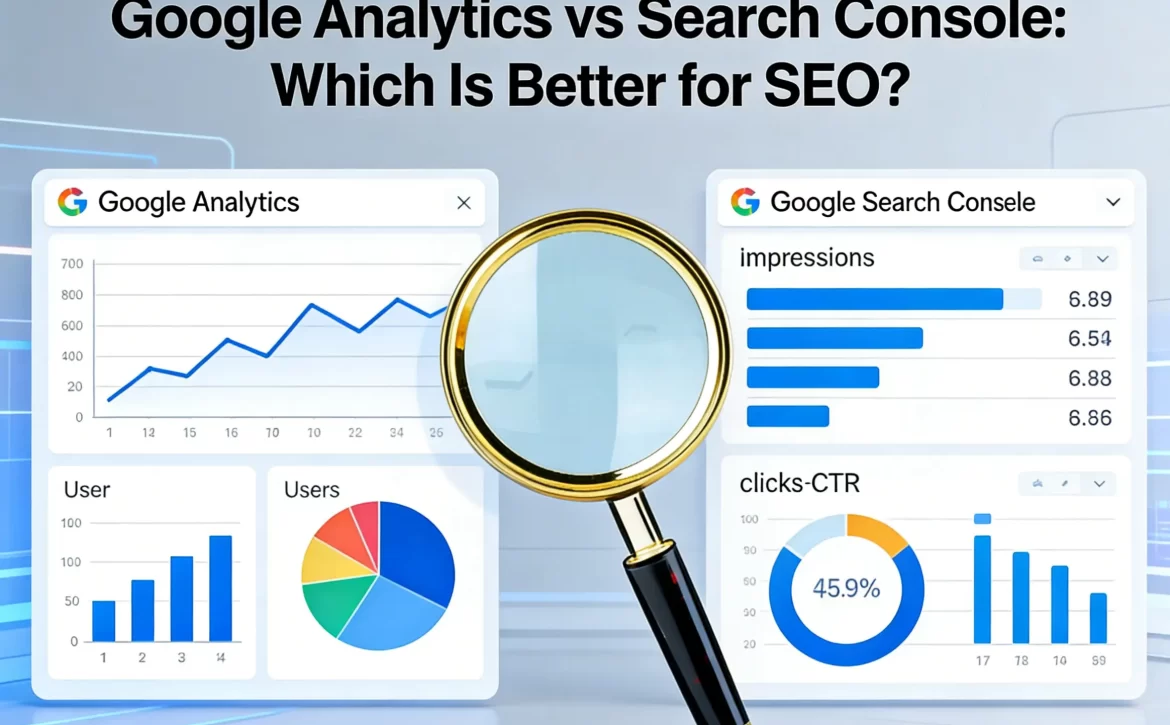
Google Analytics vs Search Console: Which Is Better for SEO?

Introduction

In the great debate between Google Analytics and Google Search Console for SEO, the very brief and concise answer is that: both are indispensablyimportant, yet they have different functionalities. Google Analytics displays the behavior of the users who have already visited your site, while the other one, Google Search Console, shows the position of your site in Google searches, and how well it performs there.

What Google Analytics Does for SEO
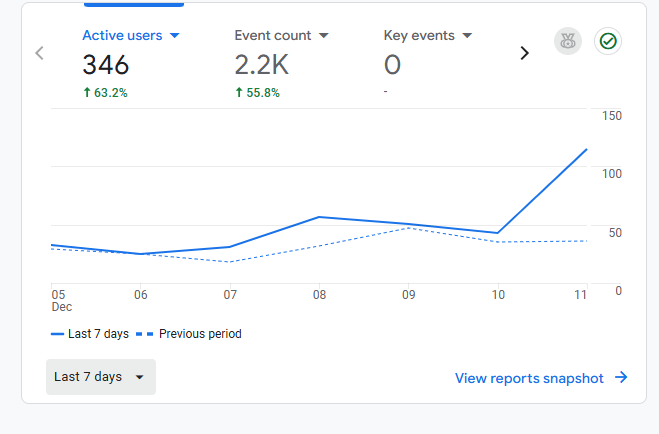
Google AnalyticsGoogle Analytics (GA) is a tool that measures visitor behavior at your site. It is all about the journey after the click.

Core Capabilities

  • Visibility of the origin of website visitors. (organic, paid, social, direct, or referral)
  • Indication of users’ actions on the site along with their duration.
  • Engagement metrics such as bounce rate, session duration, and interactions are provided.
  • Conversion data including actions like sign-ups, purchases, and form submissions is also provided.

Where GA Helps with SEO

Though GA is not directly a search tool, it still provides great insight into:

  • The most engaging pages for users.
  • The areas where there is low traffic, which can indicate problems with the content or user experience.
  • The participation of the various channels in your audience.

Limitations to Keep in Mind

  • Does not provide information about search impressions or the position of your site in Google’s result pages.
  • Depends on a tracking code, which means that if there is a problem with it, or if the user blocks JavaScript, the data could be incomplete.
  • Concentrate on the user activity after the visit to the site, not the one before.

In the event that the figures from GA do not exactly correspond to those in Search Console, just remember that this is something that usually happens. GA and GSC frequently report different numbers because they are looking at different moments (sessions vs clicks).

What Google Search Console Offers SEO
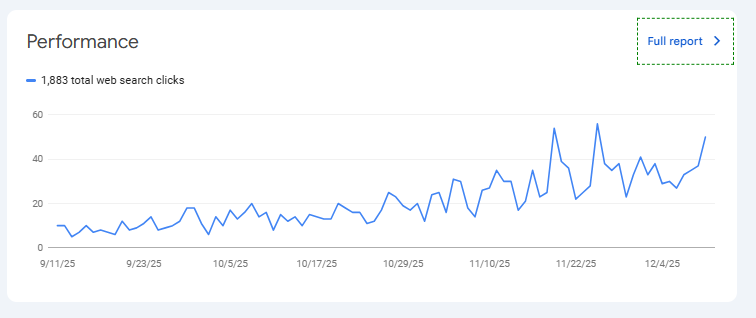
Google Search ConsoleThe Google Search Console (GSC) is the source that provides the measurements of your website from the standpoint of Google itself. It talks about search visibility, crawlability, and indexing — the pre-click world that GA cannot measure.

Key Reports in Search Console

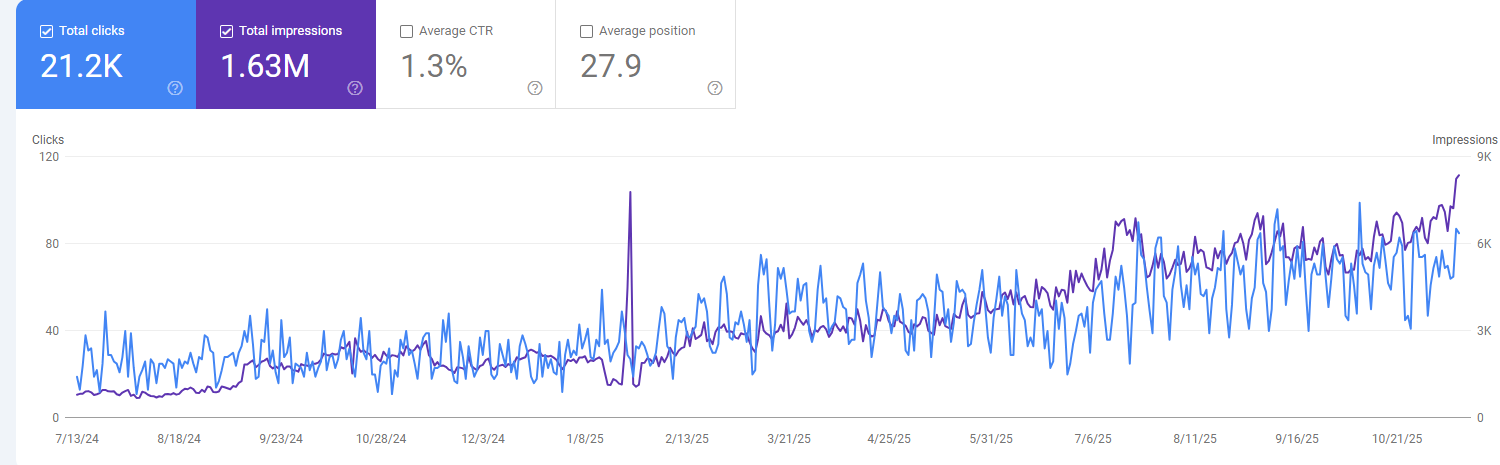
  • Search performance: for search queries the displayed data includes impressions, clicks, the click-through rate (CTR), and the average position.
  • Index coverage: it provides information about the indexed pages and those with issues.
  • The tools for URL inspection and submission of the sitemap.
  • Mobile usability, Core Web Vitals, notifications about security issues.
  • The status of backlinks and the scheme of the internal links.

Why It Matters for SEO

The Search Console mainly presents inquires like these:

  • Which queries from the search engine bring users to my website?
  • Are the search engine bots able to crawl and index my pages appropriately?
  • Is there a problem of technical nature such as mobile friendliness that is causing my pages to lose their ranking?

Things It Doesn’t Do

  • Only Google Search is included in the list of traffic sources (all other traffic sources are excluded).
  • The data presented for obviously search is not real-time and has a slight delay (typically a two-day delay).
  • The amount of historical data is restricted (usually it is about 16 months).

A minor complexity, which is worth mentioning, is that Search Console keeps track of the number of clicks coming from Google Search, while Analytics counts the number of sessions coming from all sources. Consequently, similar metrics in both tools might display different figures because of this reason.

Side-by-Side Comparison

Before Click vs After Click

  • GSC provides data about your site’s visibility in Google Search (including queries, impressions, clicks, and ranking).
  • GA clarifies user actions on your site after they land there (including behavior, conversions, and engagement).

Traffic Scope

  • GSC monitors just the organic Google search traffic.
  • GA accounts for all traffic channels: social, email, referral, paid, organic, and direct.

Reports and Analytics

  • GSC is less reliant on graphs but still provides a lot of insights that are centered around search.
  • GA is still the one that provides extensive segmentations and detailed reports on user behavior.
  • Technical SEO
  • GSC discloses issues with crawling, indexing, and it also flags the health of the site.
  • GA is not in the business of diagnosing technical search problems.

Best SEO Practices Using Both Tools

Rather than choosing “the best SEO tool,” most SEO teams rely on both because each answers a different part of the SEO puzzle.

How They Work Together

  • Link Search Console to Google Analytics so search performance data appears inside GA reports.
  • Use GSC to identify rising or falling queries or detect indexing issues.
  • Use GA to analyze how visitors arriving via those queries behave and whether they convert.

Practical Workflow Example

  1. Notice a drop in impressions for a keyword in Search Console.
  2. Check the landing page’s engagement and bounce rate in GA.
  3. If engagement is low, update the content or adjust UX.

Cross-tool analysis like this leads to practical SEO improvements rather than guessing from a single dashboard.

Final Thoughts: Which Is Better?

There’s no single “better” tool — it depends on your goal.

  • If the focus is fixing search visibility, monitoring indexing, or understanding how your site appears in Google, Search Console is the answer.
  • If the priority is tracking user journeys, engagement trends, or conversion paths after visitors arrive, Google Analytics is the stronger choice.

Used together, they provide the full picture of organic performance. That combined view is what most SEO professionals rely on to make confident decisions — not guesswork.

 

Read More
ragseo December 18, 2025 0 Comments

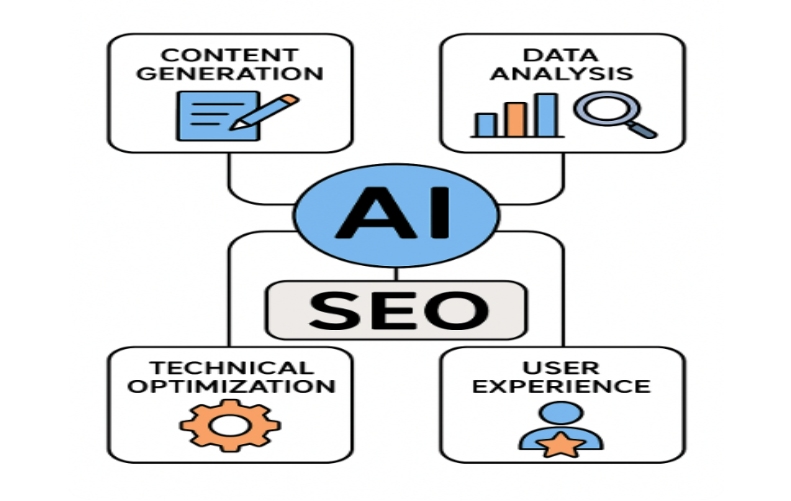
Improving SEO with AI: Optimization Strategies and Practical Applications

What is SEO?

Simply put, SEO is about getting free traffic from Google to push your website to the first page of search results, attracting user clicks, and ultimately generating conversions within the website.

Why would Google give you traffic?

Google first considers search intent. If your content happens to solve a user's problem, such as providing tutorials, data analysis, or authoritative answers, Google considers it worth recommending. For example, if you can bring commercial value to a company, the boss will value you and allocate resources to you.

The Inseparable Relationship Between AI and SEO

How to Use AI to Write High-Quality Content?

To excel in SEO, content is king. Why?

Google's mission is to present users with "four highs": high quality, high authority, high originality, and high relevance. If your content meets these criteria, users will spend more time on your page, interact more, and be more satisfied. Google will then consider your content worth recommending, and your traffic will increase accordingly.

Our strategy is to gather all textual information and other materials we can obtain from our clients' websites and feed them to RAGSEO for learning. This creates a vast knowledge base. We then use instructions to generate the content we want. This process requires human modification and intervention to ensure that every piece is original.

To write a good article, each of the following steps is crucial:

  • First, determine the main keywords and key products.This is usually determined by the company's main business, flagship products, or recent strong inquiries. For websites with average traffic, we focus on top-ranking user search terms in Google Search Console (GSC) impressions and clicks. Approximately 80% of our keywords should be based on keywords already ranking on GSC, while the remaining 20% should be developed for new keywords. This strategy aims to rank mid-to-high-level keywords first, then try for new keywords to create a breakthrough for the website. Alternatively, we can refer to competitors, using third-party tools to see which keywords they optimize in their articles and on their websites, the level of competition for these keywords, and their search volume. Further research is needed.
  • Second, choose a topic. What isa good topic? We usually use high-traffic competitor websites to research their topic directions. At this point, two situations arise:

① How can you write a compelling article on a topic that others have already written about?

② How can you stand out on a topic that others haven't written about?

Therefore, this step requires careful research from content operators, not only on the topic itself but also on a thorough understanding of the product.

  • Finally, to write high-quality content, our product must perfectly align with the topic and highlight its advantages and features to the greatest extent. This requires strong support from product content materialsoffered by Input is essential for output; this requires not only our efforts but also cooperation from both sides. Clients who are knowledgeable and willing to share will greatly benefit RAGSEO. Only by creating a treasure trove of knowledge can we have whatever we need.

The content includes two key aspects: internal links and FAQs.

①Internal links: This is a crucial step in converting articles into website links. Typical internal links connect to product pages. Anchor text selection is also critical; it should be natural and coherent, avoiding situations where internal links are all within the same paragraph. Otherwise, the article's weight will be unbalanced, and it may appear as internal link stuffing.

②The FAQ section usually asks questions based on the article's theme and content. Placing the questions users most want to know after reading the article and their pain points in the FAQ section will increase the time users spend on the page. Users will feel that you have grasped their psychology, which is more conducive to conversion.

How to utilize AI to analyze data and issues in SEOHow to use AI to analyze SEO data and identify problems?
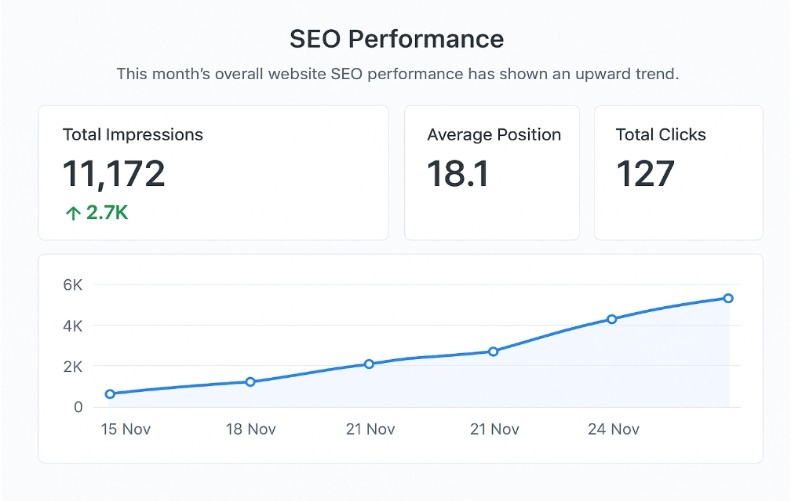
  • We typically use AI to analyze changes in website data, such as increases or decreases, and trends. AI efficiently and accurately provides feedback on calculations in a short time, greatly improving our work efficiency.
  • AI calculated SEO dataAI can also be used to analyze data that is difficult to understand. It will provide you with detailed explanations of the most likely cause, how to verify it, and how to fix it. You can even directly send the problematic part as a screenshot to AI, which can identify the content in the image and provide solutions.
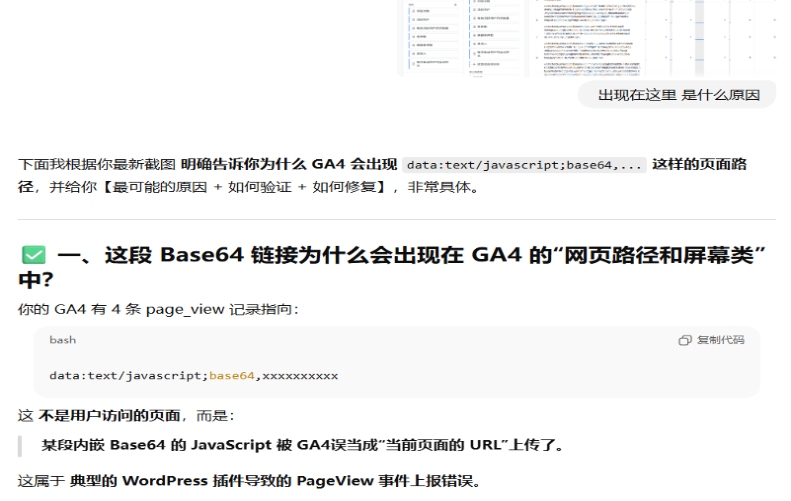
  • Take a screenshot of the SEO data and ask the AI.When encountering URLs that seem problematic, AI can be used for analysis. It can usually explain the URL generation rules and the actual meaning behind each part, giving us a more accurate analytical perspective.
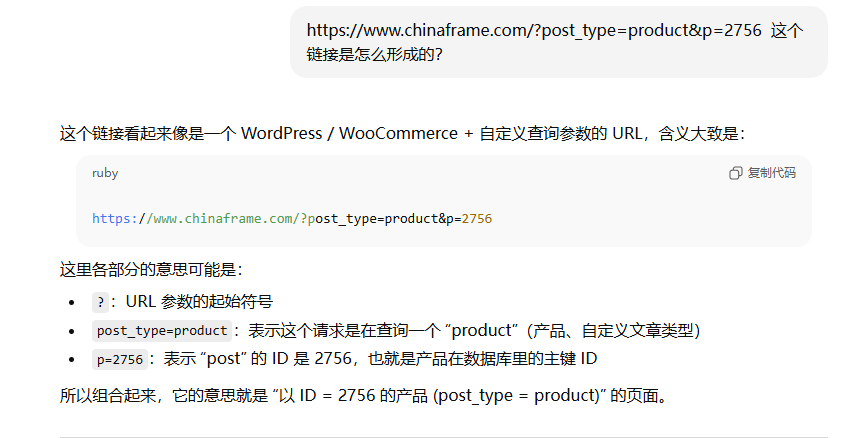
Utilizing AI to analyze URLs for formationHow to quickly convert code using AI?

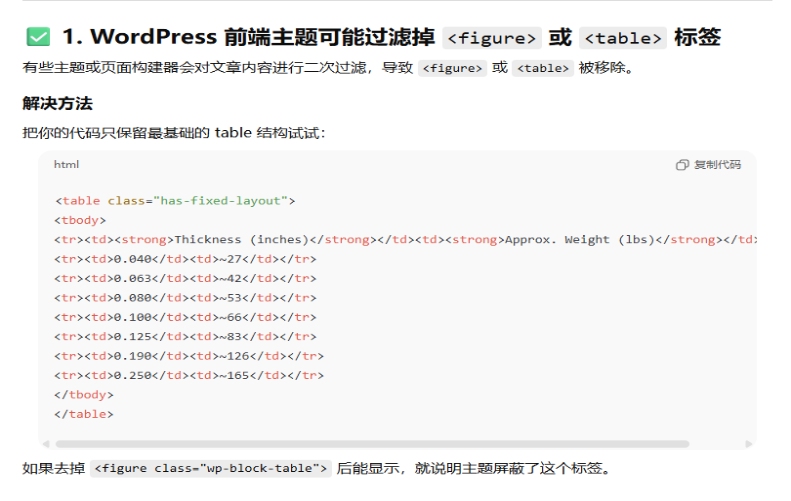
  • Table issues are frequently reported during the publishing process in the WordPress admin panel. Different editors have different methods for adding table code. AI can be used to adjust and modify the original table code, preserving the parts that won't be filtered by the admin panel, thus ensuring the table is displayed effectively.
  • Transcoding of the table code in the WordPress backendAt the same time, AI can generate or optimize structured data, improving the search engine's ability to understand content. Structured data FAQs need to be converted into JSON-LD Code format before being updated, and AI can also be used for format conversion.
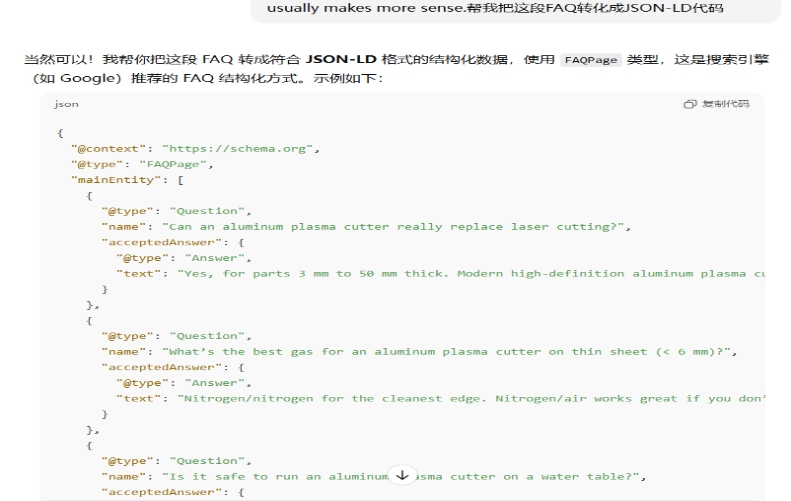
  • JSON-LD Code format utilizes AI for encodingAI can also generate meta tags, alt text, and optimize titles. By placing keywords and their density in the instructions, AI can quickly convey the results to us. During the AI's thinking process, we can also copy new pages and issue instructions at the same time, which will make the process more efficient.

What is the fundamental difference between SEO and GEO?

SEO: I search with a specific intention, and it provide me with highly relevant and matching content.

GEO: I ask it a question without a specific intent, expecting an answer.

SEO + AI combines user search intent to quickly provide highly relevant content, while GEO + AI allows users to instantly receive customized answers and enjoy interactive fun. Both achieve rich and diverse effects in user experience.

The essence of GEO is achieving keyword search results. We use third-party platforms to publish articles, which is equivalent to building external links. The speed at which keyword search results become effective may far exceed that of SEO. However, SEO is a long-term and stable process. In this regard, Inquiry Cloud has absolute authority, with benchmark clients in various industries. The results of our clients' websites speak for themselves.

In the field of SEO, what role does AI playWhat role does AI play in practical SEO?


AI doesn't screen customers for you; it gets you screened by customers. Its primary task is to output a large amount of textual information, such as product introductions and company development information, to the internet,making it easily crawlable and digestible for AI. It is necessary to learn to use AI as a sales channel, that is, to leverage AI's platform to deliver your content and attract a customer market that matches your needs.

FAQ

Q: Will using AI to write content get me flagged as an AI site by Google?

A: There's no explicit statement that using AI to write articles will automatically get you flagged as an AI site. Google prefers high-quality content that meets user search intent. The key issue isn't AI itself, but the lack of professional endorsement. Without human intervention, AI-generated content is bound to be superficial, vague, lacking in substance, and keyword-stuffed. AI can be used, but human editing is essential to ensure accuracy and coherence.

Q: How can I use AI to find long-tail keywords?

A: Method 1: Use main keywords + clear intent

Examples: Hair dryer + how to choose? Scarf + price budget; Electric fan + repair tutorial

Method 2: Use main keywords + pain points

Examples: Food-grade silicone + is it safe? Dehumidifier + warranty Beauty device + visible results

Q: How can I use AI to find competitors?

A: Method 1: Ask directly for recommendations of 10 top beauty device manufacturers.

This method may include brands that have used GEO (Google AdSense) to gain traction, so it's best to use third-party tools to verify their website data. Also, the AI's results may vary depending on VPN usage, and the regions it matches may differ from your actual search criteria.

Method 2: Search for keywords related to a website's main business, adding suffixes like "blog/tutorial/news hot topics," etc.

This will help find highly relevant competitor websites. Then, use third-party tools to check their traffic.

Method 3: Use precise matching. Use main keywords + industry type + service type + target audience + main business region/market for AI to perform precise matching.

Read More
ragseo December 15, 2025 0 Comments

SEO Traffic Breakthrough: Pick the Right Target Keyword—and Let Content Lead the Way

“Miss the internet, and you miss an entire era.”

I. Introduction

In today’s digital world, searching online has become part of everyday life. People turn to search engines for answers, solutions, and products, which also gives businesses a much broader space to reach customers. Naturally, companies want their websites and products to appear where users can see—and that’s exactly where SEO steps in.

But how can a website gain traffic faster and more efficiently? The answer usually begins with two things: picking the right keywords and creating genuinely useful content.

II. Choosing the Right Target Keywords

Why does keyword selection matter so much?

Because SEO, just like paid search, is a pull-based marketing model. You only show up when someone searches. If nobody searches the keyword you target, your website gets no exposure—simple as that.

keyword optimizationSo the keywords we choose must meet two essential conditions:

  1. They must have real search volume.
    If people aren’t typing these terms into Google, then ranking for them won’t bring any traffic.
  2. They must be precise and relevant.
    The people searching these terms should be potential buyers or suppliers actively looking for the type of product you offer.

If a company can’t find keywords that are both searchable and relevant, then SEO simply isn’t the right channel for that company.

III. What Does “Effective Content” Actually Mean?

Once your keywords are set, the next question is: What kind of content will truly perform?

Content-is-kingTo answer that, we need to think about why content matters so much in the first place. The primary goal of any search engine is to satisfy user intent. Users expect helpful, accurate results. If they keep seeing irrelevant content, they’ll switch to a different platform.
So instead of asking, “What does the algorithm want?” we should ask,
“What do our users want to know?”

Before we publish content for clients, our SEO content team studies the product and industry in depth, writes the article based on real expertise, and then checks grammar, originality, readability, AI-detection score, and product relevance. These checks ensure the article meets basic quality standards—but they’re not the end goal.

The real question is:
Does this content genuinely solve the user’s problem?

High-quality content isn’t created for search engines.
It’s created for the people reading it—and search engines reward that naturally.

IV. Conclusion

Whether you’re starting with SEO or GEO, the first step is always the same: work with professionals to identify strong, actionable keywords. Get the keywords wrong, and you’ll waste months of effort. Get them right, and you’ll build a foundation that supports everything else.

From there, content becomes the deciding factor. When users click into your website and stay because your content is clear, useful, and trustworthy, search engines notice—and reward you with more visibility, regardless of whether you're undertaking SEO, GEO, or Google AIO.

At the end of the day:

Right keywords bring users in.
Right content keeps them there.
And together, they power long-term traffic growth.

Read More
ragseo December 11, 2025 0 Comments

3 Types SEO Plugins for WordPress

1. Plugins for Configuring Google Search Console and Google Analytics

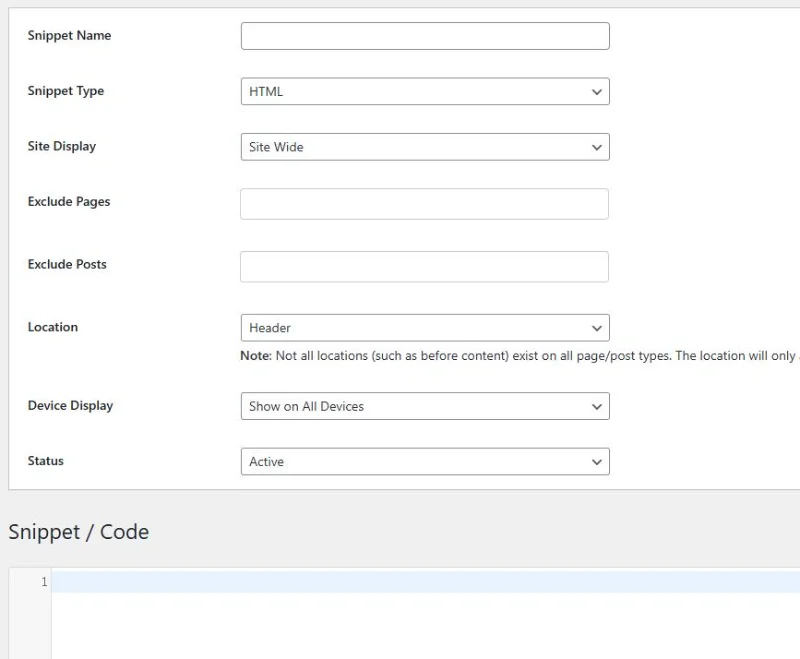
Header Footer Code Manager

Function: Used to add code in the header and footer

Basic Configuration Methods: Choose “Custom” for Snippet Name, “HTML” for Snippet Type, “Site Wide” for Site Display, and “Header” for Location. Place the Google Search Console and Google Analytics code in the Code field , then ,click “Save”.

Header Footer Code Manager2. Website Optimization Plugins

Smart SEO Tool

Function: Used to configure webpage TDK, sitemaps, robots, etc.

TDK refers to the Title, Description, and Keywords of a page, which are displayed in Google’s search results. These texts need to align closely with the content of the page, helping to increase clicks from targeted users, thus improving the conversion rate.

Sitemap.xml refers to a sitemap, where users can set which website links to display based on their needs. Usually, the homepage, product catalog, product details, blog directory, blog details, and main menu bar page are included in the sitemap. Other elements like author’s links, unnecessary pages, and template links are excluded.

“Robots.txt” refers to the web crawler rules. When a crawler enters a website, it first reads the Robots.txt file. “User-agent” refers to allowing all crawlers to crawl. “Disallow” refers to blocked links. “Allow” refers to allowed links. Setting a Robots.txt file helps to allocate crawling quotas effectively, ensuring crawlers focus on main pages and don’t waste quotas on secondary pages. Generally, it blocks backend URLs, author links, and other non-canonical links.

In short, you can think of a website as a house, Robots.txt as the rules for visitors, the site map as the location of the rooms in the house, and web crawlers as visitors. Web crawlers can use the map to visit all the rooms, but some web crawlers will not follow the visitor rules.

Basic Configuration Methods: Activate the TDK optimization button in the general tab to fill in the TDK at the bottom of category and page pages. Then Click “Sitemap” to enable automatic sitemap updates and click other miscellaneous options to configure the robots.

Perfmatters

Function: Used for web page code optimization

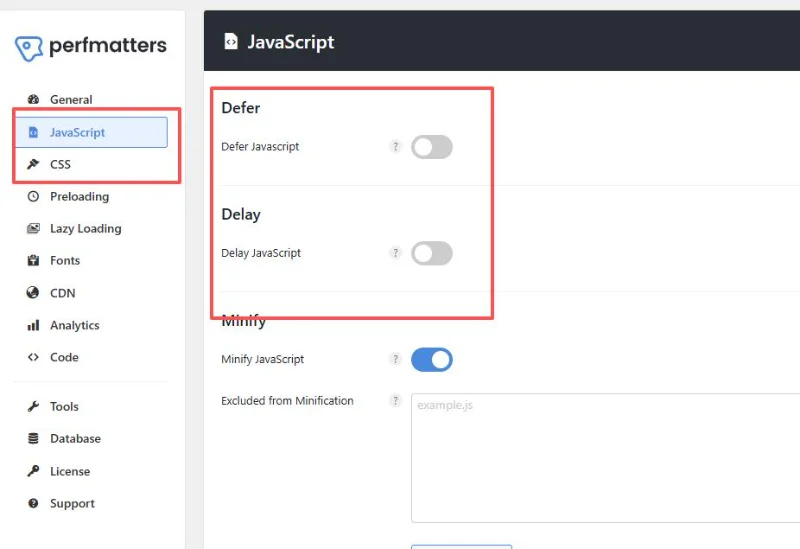
Basic Configuration Methods: Upon activation, the plugin removes unnecessary code from the header by default. Choose whether to apply optimizations like Defer and Minify to JS and CSS files, and whether to enable lazy for images.

Usually, CSS and JS files are compressed as they can slow down page load speeds. JS files and images are often deferred or lazily loaded, meaning they are loaded after the HTML content, which improves overall page load time. You can also use other plugins to combine CSS and JS files, but be aware that this may cause style issues, so you need to back up the site before merging them.

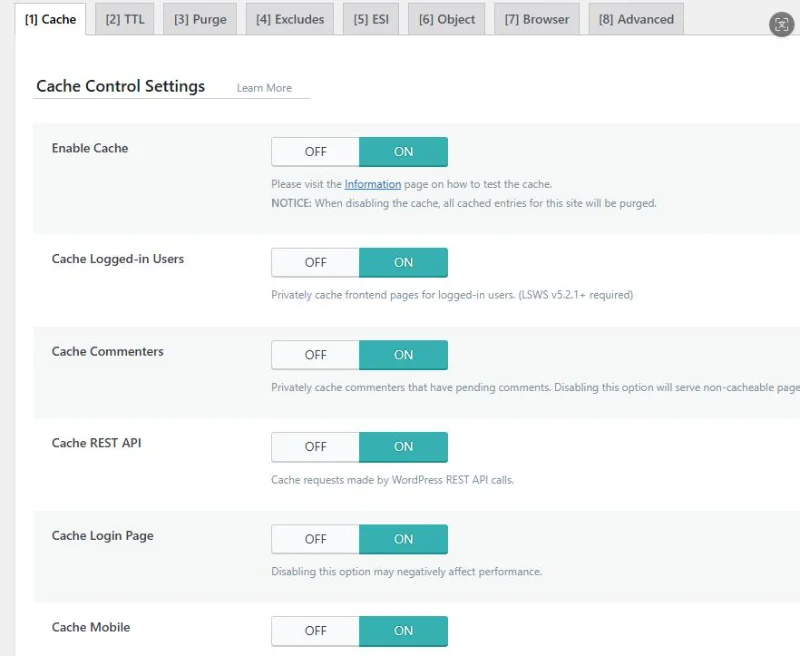
PerfmattersLiteSpeed Cache

Function: Enables caching for the website

Page caching refers to converting dynamic pages into static pages. The advantage is faster page load speeds, as users can see the page content without querying the database. The disadvantage is that the page may not update immediately. This is suitable for pages that don’t frequently call data, such as related product links on a product detail page, which don’t change often.

Basic Configuration Methods: Page caching is automatically enabled upon activation. You can customize the settings in the Cache section.

LiteSpeed Cache3. Plugins for Handling Inquiries

Contact Form 7

Function: Used for creating contact forms

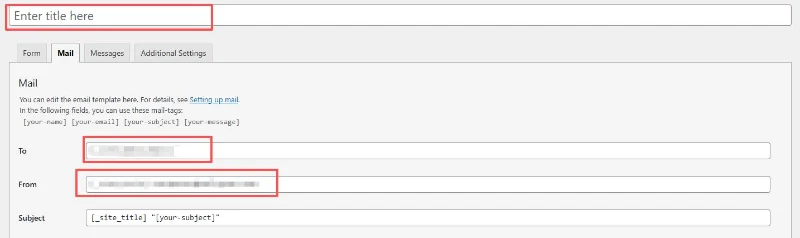
Basic Configuration Methods: Click “Add Contact Form” under Contact to create a contact form. Set the form name in “Enter title here” and configure the sender and recipient in the “Mail” section, then click “save” on the right. You can place the generated shortcode in the corresponding position on the page editor.

Contact Form 7WP Mail SMTP

Function: Used to configure the email sender

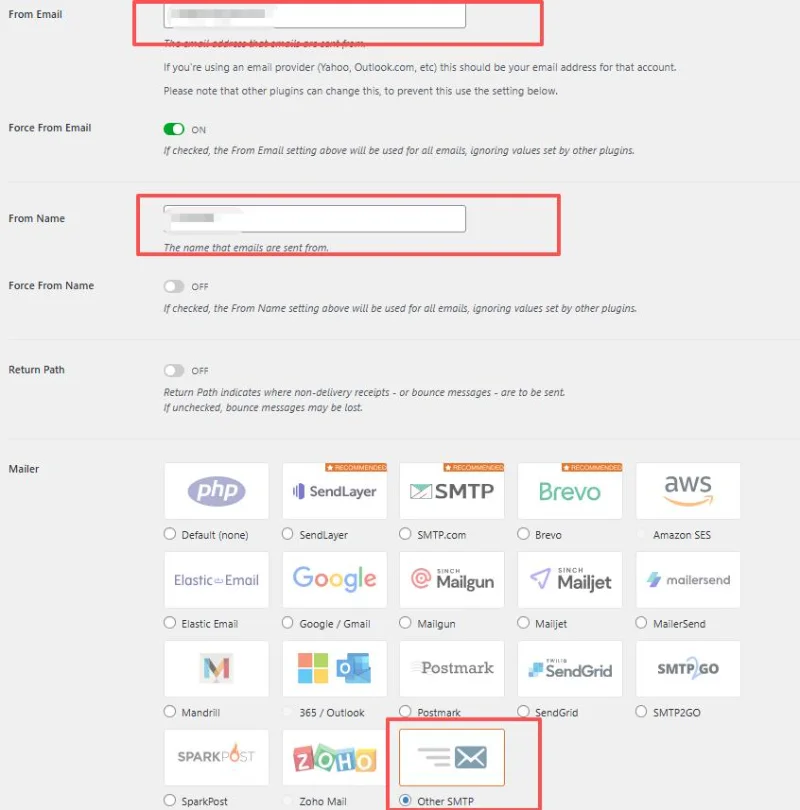
Basic Configuration Methods: Go to the Settings page of WP Mail SMTP, enter the sender’s email in “From Email”, and choose the appropriate Mailer according to the email service provider (e.g., choose “Other SMTP” here).

WP Mail SMTP

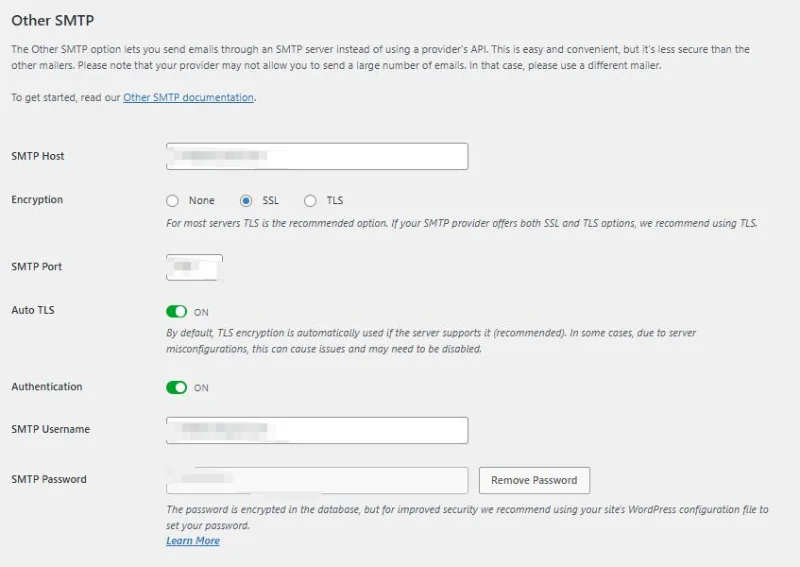
Fill in the SMTP Host and Port for email service provider, and enable SMTP and POP services in email account. After obtaining the client password, enter the email and client password.

WP Mail SMTP-2Flamingo

Function: Used to store user-submitted form data from Contact Form 7

Basic Configuration Methods: Enable the plugin, and it will run automatically.

reCAPTCHA

Function: Blocks spam

Google reCAPTCHA V3 rates website users on a scale of 0.1 to 1.0. The closer a score is to 0.1, the more robotic the user appears, while the closer a score is to 1.0, the more human the user appears.

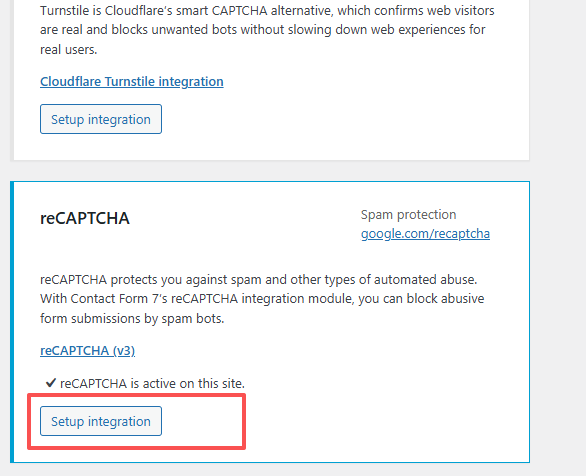
Basic Configuration Methods: Go to the Integration section under Contact, find reCAPTCHA, and click “Setup”. Use Google account to visit https://www.google.com/recaptcha/admin/create, choose reCAPTCHA V3, fill in the required information to obtain the secret key, and enter it in the corresponding fields. Set the score to 0.5 to filter most spam emails.

Setup Integration

Read More
ragseo December 8, 2025 0 Comments

The Ultimate On-Page SEO Checklist for 2025

SEO keeps changing every year, and it's getting harder to keep up with everything you need to do — from optimizing for Google to making sure your site actually feels good to use. With so many details to pay attention to, it's totally normal to feel unsure about where to begin.

That's exactly why I put together this on-page SEO checklist. Whether you've been doing SEO for years or you're just starting out, this guide walks you through the essentials step by step. It'll help you improve visibility, bring in more organic traffic, and hopefully turn more visitors into customers.

Ready to get started? Let's jump in!

Step1: Understanding Keyword Strategy and Search Intent

Aligning Content with User Intent

People type things into Google for different reasons. Some just want to learn something new. Others already know what they want and are ready to buy. A good page matches exactly what the searcher needs at that moment.

Picture this: a mom searches “what is SEO” because she heard the word at a business meeting. She's still curious. Now imagine a shop owner typing “best SEO agency near me” at 8 p.m. because his sales dropped last month. That guy is ready to hire someone tomorrow.

That's why we split keywords into three simple groups:

  • Learning stage: “What is SEO marketing?”, “How does SEO work?”
  • Shopping-around stage: “Top SEO services in 2025”, “SEO or PPC for online stores”
  • Ready-to-buy stage: “Cheap SEO company in London”, “Hire SEO expert today”

Long phrases like “SEO help for small shops in Texas” bring fewer visitors, but those visitors usually call or fill out the contact form the same day.

Conducting Effective Keyword Research

Everything starts with finding the right words. Free and paid tools such as Google Keyword Planner, Ahrefs, and SEMrush tell you how many people search a word each month and how hard it is to rank.

I personally open ten competitor pages that already rank in the top spots. I write down every question they answer. Whatever they missed, I cover on my own page. Works every time.

Don't just chase the exact same words. Google is smart now. When someone looks for “SEO services,” it also understands pages that talk about “get found on Google,” “rank higher,” or “bring more website visitors.”

Step2: Crafting SEO-Friendly URL Structures

Characteristics of an Optimized URL

Good URLs are short and make sense when you read them out loud. Example of a clean one: https://www.ragseo.ai/seo-services-for-ecommerce

Bad example full of numbers and letters: https://www.ragseo.ai/index.php?id=123&category=45

Put the main words in the web address, use dashes between words, and keep everything lowercase.

Avoiding Common URL Mistakes

Try not to use question marks and long codes unless the shop software forces you. Also drop small words like “and,” “or,” “the” – they just make the link longer for no reason.

Title Tag OptimizationStep3: Title Tag Optimization Techniques

Writing Effective SEO Titles

The blue headline people see in Google is still super important. Put the most important words near the start. Good title: “SEO Services for Small Businesses | Friendly Expert Help”

Keep it under 60 letters and spaces so nothing gets cut off. Words like “Best,” “2025,” “Near Me,” or “Free Audit” make people more likely to click.

Common Pitfalls in Title Tags

Never copy the same title to ten different pages. Google gets confused and may pick the wrong one to show. Also, stuffing five keywords into one title looks terrible and can get you in trouble.

Step4: Enhancing Meta Descriptions for Visibility and CTR

Best Practices for Writing Meta Descriptions

The short text under the blue link is your free ad. Write 150–160 characters that explain exactly what the visitor will find. Add the main keyword once so it shows in bold when someone searches it. End with “Call now,” “Get your free report,” or “See pricing.”

How Meta Descriptions Impact SEO Performance

When the little description matches the page, people land on, they stay longer. Longer visits tell Google the page is helpful, and your ranking slowly climbs.

Step5: Structuring Headers from H1 to H3 for Clarity and SEO Value

Importance of Proper Header Hierarchy

Use only one big H1 title – usually the same as your page title. Then break the rest into H2 sections and smaller H3 points. It looks tidy and Google loves the clear order.

Improving Accessibility and Crawling with Headers

People who use screen readers jump from heading to heading. When yours are neat, they have a better time. Google bots do the same thing – clean headings help them understand the page faster.

Step6: Creating High-Quality Page Content That Ranks and Converts

Elements of Valuable On-Site Content

Write helpful stuff that actually answers questions. No fluffy sentences just to fill space. Short paragraphs, bullet lists, and pictures keep readers happy. I aim for language an average 13-year-old can understand without stopping.

Incorporating Keywords Naturally into Content

Say the main phrase once or twice in the first few lines, once in a heading, and a couple more times lower down. Then talk about related things: costs, time frames, real client results, common mistakes – whatever your visitor cares about next.

Step7: Optimizing Images and Media for Performance and SEO Value

Image Optimization Techniques

Big photos make pages load slowly. Everyone hates waiting. I run every picture through TinyPNG – it cuts file size in half with no visible difference. Save new images as WebP whenever possible. Add alt text that describes what's in the picture and slip the keyword in if it fits naturally.

Enhancing Media Engagement

Turn on lazy loading in WordPress or with one line of code. Pictures only download when the person scrolls down to them. For videos, upload to YouTube first, then embed. Your own server stays fast.

Step8: Building an Effective Internal Linking Strategy

Benefits of Internal Links for SEO and UX

Links inside your own site help Google find new pages and spread “ranking power” around. They also keep visitors clicking to the next article instead of leaving. One client added just six smart internal links and saw average visit time jump from 1 minute 20 seconds to almost 4 minutes.

Best Practices for Internal Linking Structure

Use real words in the clickable text: “how to choose an SEO company” instead of “read more.” Three to seven links per page is usually perfect.

Step9: Using Outbound Links Strategically (Optional)

When Outbound Links Add Value

Linking to trustworthy places like Google's official blog or well-known tools shows you know your stuff. Always open those links in a new tab so people can come straight back.

Step10: Technical On-page Optimization Essentials

Key HTML Elements That Influence SEO

Canonical tags fix duplicate page problems. Hreflang tags make sure Spanish speakers see the Spanish version. Simple tags, big results.

Managing Crawlability Through Robots.txt & Meta Tags

Put “noindex” on thank-you pages and login pages. Check robots.txt twice a year – one wrong line can hide your whole site from Google by mistake.

Page SpeedStep11: Enhancing Page Speed & Core Web Vitals Performance

Core Metrics That Matter in 2025

Largest Contentful Paint (LCP)

Try to load the main content in under 2.5 seconds. Fast hosting + image compression + caching usually gets the job done.

First Input Delay (FID)

People should be able to click or type within 100 milliseconds. Remove heavy scripts that run before the page shows.

Cumulative Layout Shift (CLS)

Stop things from jumping around while the page loads. Reserve empty boxes for ads and images from the beginning.

Step12: Ensuring Mobile-Friendliness & Optimizing UX Design

Mobile Optimization Priorities

Test every new page on a real phone. Buttons must be big enough to tap with a thumb. No giant pop-ups that cover the whole screen.

Improving User Experience Across Devices

Same menu, same buttons, same colors on desktop and phone. Big text, lots of white space, fast loading – happy visitors on every screen size.

Step13: Leveraging Conversion Rate Optimization (CRO) Principles

Aligning SEO Goals with Business Objectives

Traffic is nice, but phone calls and form fills pay the bills. Put one clear button above the fold and another at the bottom. “Get My Free SEO Audit” works better than just “Submit.”

A/B Testing Key Page Elements

Change one thing at a time – headline, button color, picture – and watch which version gets more clicks or leads. Small changes sometimes double results.

Step14: Implementing Structured Data Through Schema Markup

Types of Schema Relevant for On-page SEO

Article / BlogPost Schema

Add the little code that tells Google the author name and publish date. Many times the post then shows a nice picture and star rating in search results.

Product / Review Schema

E-commerce pages with price and star ratings in Google get way more clicks – sometimes 20–30% more.

FAQ / HowTo Schema

Mark up questions and answers. Google often shows them as expandable boxes right under your link. One extra question can take up half the first page of results.

Google Search Console MonitorStep15: Indexing & Monitoring Your On-page Efforts
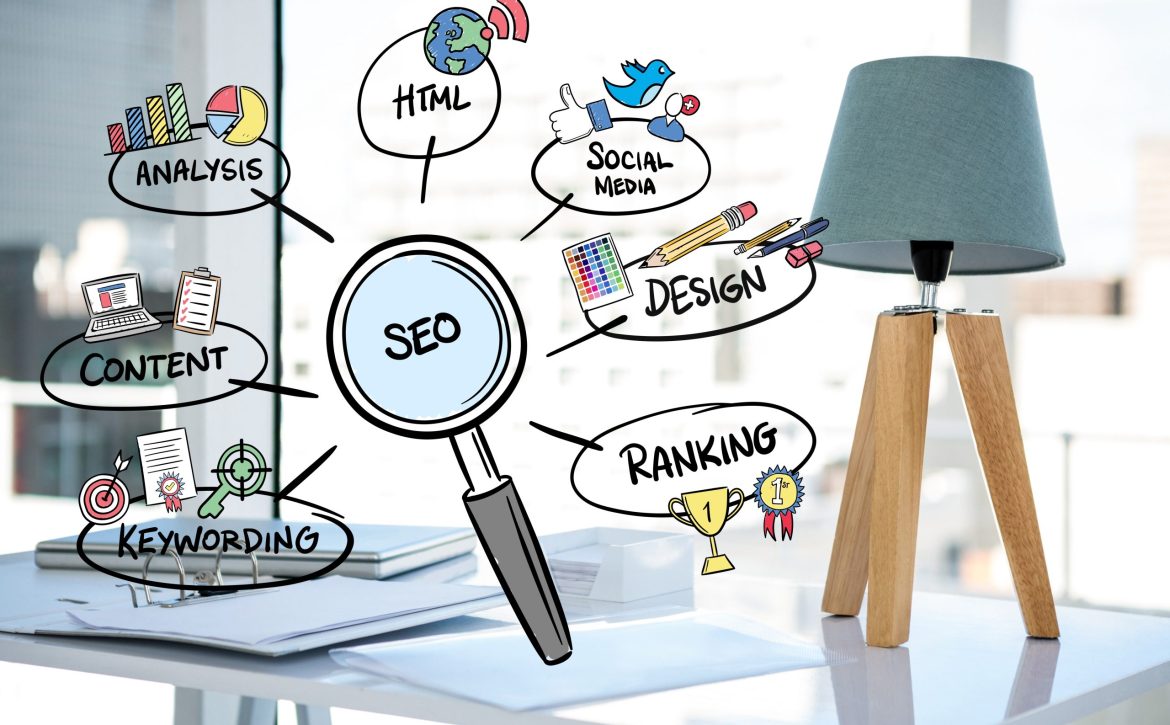

Ensuring Pages Are Properly Indexed by Search Engines

After big changes, upload the new sitemap in Google Search Console. Once a month type “site:yourdomain.com” in Google to see if everything is still there.

Monitoring Performance Through Analytics Tools

Watch rankings in Ahrefs or SEMrush every week. Open Google Analytics 4 to see which pages make people stay longest and which ones they leave in five seconds. Fix the weak pages first.

Ready to put all of this into action without spending months learning every detail yourself? The team at RAGSEO.AI has done this for hundreds of shops, local businesses, and online stores around the world. Drop by RAGSEO.AI today, tell us about your website, and we'll show you exactly what to fix first!

Read More
ragseo November 26, 2025 0 Comments
digital composite of business graphics with office background

How to Conduct SEO Keyword Research

When it comes to SEO, keywords are unavoidable. So what exactly is the role of keywords? How do you select the right keywords for your website? How can keywords be used to effectively improve your website’s performance? Today, we will look at the importance of keywords in SEO and the real ways to do keyword research — from basic ideas to step-by-step actions.

Why Keyword Research is the Core of SEO

First, we need to know how users find websites. A person types something into Google, the search engine checks billions of pages and shows the best matches on the results page (SERP). That thing the person typed is the keyword. If you want the right people to see your page, your content has to match their keyword very well so the search engine will show your page.

Keywords Determine Content Direction

For example:

  • Users searching “how to clean an air conditioner” want a simple cleaning guide
  • Users searching “air conditioner wholesale” are usually dealers who need prices and suppliers

Different keywords show different needs. Your content must fit the real need behind the keyword, or users will leave and search engines will not rank you high.

Keywords Help Understand Users’ Real Needs

When you research keywords, just type them into Google yourself and look at the current top results. You will immediately see what kind of pages users like most for that search. By checking the style, length, and layout of the top pages, you can clearly see what users really expect. This gives you a strong base for making your own content.

KeywordKeywords Improve Content Precision

Putting the right keywords naturally in your content helps users and search engines quickly understand what the page is about. When a page has no clear main keyword, it feels messy and unfocused. When you build the page around one main keyword, search engines see it as very relevant and give it better ranking. You also get better visitors — people who type that keyword already want what you offer, so they are more likely to buy, contact you, or sign up.

Preparatory Work Before Keyword Research

Clarify Business Positioning and Target Audience

Before you open any tool, answer these questions first:

  • Is your business B2B or B2C?
  • Are there special terms or common search habits in your industry?
  • Do you want customers from the whole world or only certain countries?

These answers will decide which keywords are truly useful for you.

Business To Business ConceptCompetitor Keywords Are Extremely Valuable
If you are new and don’t know where to start, just look at the websites that already rank at the top in your industry. Use tools to see which keywords they rank for and how they use them. This is the fastest way to find the most important keywords in your field.

Recommended tools:

  • Ahrefs
  • SEMrush
  • Moz
  • SimilarWeb
  • Google Keyword Planner

Expand Your Keyword Library

After you collect the main industry keywords, mix them with your own products and services to make the list much bigger. This list will guide all your future articles, product pages, and optimization work.

Common expansion directions:

  • Long-tail keywords → Fewer searches but much higher conversion rate
  • Comparison keywords → e.g., “A vs B”, “best”, “top”, “review”
  • Pain-point keywords → e.g., “xxx issues”, “xxx not working”, “how to fix xxx” (4) Purchase-intent keywords → e.g., “price”, “supplier”, “wholesale”

How to Evaluate Keywords

The value of a keyword usually depends on three things: search volume, competition level, and what the current search results page looks like.

Search Volume

This number shows how many people search that keyword every month on average. Some keywords sound good but almost nobody searches them — ranking for them brings zero traffic. Note: Low-volume keywords are often very specific. People who use them know exactly what they want, so they convert much better.

Also, be honest with yourself. If your site is new or small, very high-volume keywords are usually controlled by big, old websites.

Competition Level

High search volume almost always means high competition — everyone wants those keywords. Ranking for them takes a lot of time and work. Medium- or low-competition keywords are perfect for fast results. Fewer sites fight for them, so one excellent page can rank quickly.

SERP Analysis

SERPLook at the current top 10 results and notice:

  • If most are blog posts or guides → use the keyword on an article or guide
  • If most are product pages or shop categories → use the keyword on your product or category page

When your page type matches what is already ranking, you have a much better chance to rank and make users happy.

Summary

In short, turning keywords into real traffic is a long-term job with very good rewards. Keyword research is not just one small step — it is the foundation that decides the direction of all your SEO work and future traffic growth. SEO needs constant testing and improvement. Only when you really understand what users need can you get steady, growing traffic that lasts for years.

Read More
ragseo November 24, 2025 0 Comments

How to Do Competitor Analysis for SEO

Staying competitive in SEO isn't just about fixing your own website or publishing a few polished articles. It also requires paying attention to what others in your space are doing.this kind of review isn't something you do once. It's more like a routine check-up that helps you understand what's happening in your market.

In this guide, I'll walk through a clear and practical way to look at competitors, using simple steps and real observations.

Why Competitor Analysis Matters in SEO

Competitor analysis gives you a chance to see how similar websites in your niche attract attention. It's easy to assume you already know the landscape, but when you actually look at their pages and search performance, you usually find a few surprises.

You start noticing things like:

  • The keywords bringing them steady visibility
  • The type of articles or landing pages they publish most often
  • Backlink sources they rely on
  • How their navigation and site structure guide users
  • Little UX decisions that keep visitors engaged longer

This information helps you shape a strategy that responds to real-world signals instead of guesswork. You get a better idea of which areas are worth your time and which ones matter less than you thought.

Keyword Analysis1.Keyword Analysis: Finding the Opportunities You're Missing
Keywords remain the foundation of search traffic. When you compare your keywords to those of your competitors, you quickly see which areas they cover well and which ones you haven't touched. These missing pieces often turn into easy wins, especially if your site already covers related topics.

The power of long-tail keywords

Long-tail keywords — simple phrases with three or four words — look small at first, but they can bring in very focused visitors. They:

  • ave clearer intent
  • Face less competition
  • Usually convert better
  • Often help you build topic authority faster

A lot of websites skip these terms because the search numbers look low. But when you add up 20, 40, or even 60 long-tail terms, you suddenly get a steady flow of targeted traffic. That's why long-tail keywords often end up being the easiest path to rank faster.

Building a high-potential keyword list

A keyword gap analysis lets you see:

  • Keywords your competitors rank for but you don't
  • Long-tail variations you haven't explored
  • Industry topics missing from your content
  • Search terms with strong buying intent

In practice, even a small list can make a noticeable difference. I've seen teams grow organic traffic simply by filling a handful of keyword gaps each month.

2.Understanding Competitors' Content Strategies

Content is where keywords actually live. And every industry tends to prefer certain styles of content, which you can clearly see once you analyze a few competitor sites.

Industry examples of content behavior

Beauty and eyelash brands usually create content around everyday scenarios — bedtime care routines, gym-friendly looks, wedding styling ideas, and simple “commute makeup” tips. These topics help readers picture the product in normal life.

Vape and e-cigarette brands often take a different approach. Their content tends to be more practical: product comparisons, detailed reviews, model breakdowns, or updates on new regulations. Their audience usually wants clarity and trust before buying anything.

Content structure cues worth analyzing

When reviewing competitor content, note details such as:

  • How they open an article
  • Whether they use tables, visuals, or comparison charts
  • How deep they go into each section
  • Whether the format makes the article easy to skim

These patterns show you what works in your field and what your readers like to read.

Spotting content gaps

Content gaps usually fall into two types:

  • Topic gaps— things they cover that you don't
  • Depth gaps— shared topics where their content feels thin

These are the quickest opportunities to publish stronger, more helpful pages.

Backlink Analysis3.Backlink Analysis: Reverse-Engineering Authority

Backlinks still play a big part in search rankings. Looking at competitor backlinks gives you insight into the sources that strengthen their authority.

Key backlink dimensions to evaluate

Pay attention to:

  • Where their links come from
  • How relevant those sources are
  • The way anchor text is written
  • Whether their link growth looks steady
  • Which pages attract the most links

This helps you understand whether their authority is built slowly and naturally or boosted by aggressive outreach.

Using backlink insights to plan your strategy

Common backlink opportunities include:

  • Guest posting on relevant websites
  • Replacing broken links with your content
  • Joining communities and forums in your industry
  • Creating content that naturally attracts backlinks

The idea isn't to copy every link they have. It's to identify patterns and build a strategy that fits your brand.

Website Architecture4.Analyzing Website Architecture

A website's structure tells you a lot about how a company thinks about content.

Elements to examine

  • how the site is set up overall
  • the main sections, like the big categories and the smaller ones under them
  • how these sections connect to each other
  • what each section is supposed to cover

Industry example: B2B apparel websites

Many B2B apparel sites follow a pattern:

  • Category pages focus on enterprise keywords and include details on customization, sizes, materials, and bulk ordering
  • Product pagesare kept simple — listing specs, colors, sizing tables, and essential information

This setup puts most of the SEO and enterprise traffic on the category pages, while the product pages stay simple enough for quick scanning and inquiries. It ends up creating a clear conversion path.

Technical SEO and User Experience5.Technical SEO and User Experience Factors

Even the best content can struggle if the technical setup of the site is weak. Technical SEO and UX shape how search engines and users interact with your pages.

Technical factors to compare

Check:

  • Page loading speed
  • Core Web Vitals
  • Mobile layout stability
  • Structured data usage
  • Internal linking health
  • Crawlability and indexation
  • Handling of duplicate content

UX patterns that impact SEO

Good UX keeps people on the page longer, and search engines notice that. A few things play a big role:

  • Readability— clear, easy-to-skim content that doesn’t feel heavy to read.Menu clarity
  • Menu clarity— simple navigation so visitors can find key pages without digging around.
  • CTA placement— buttons or next steps placed where people naturally pause, not hidden somewhere odd.
  • Bounce rate & time on page— quick signals that improve when the page is easier to follow.
  • Visual consistency & trust signals— consistent design, with things like clear contact details or partner logos, tends to feel more trustworthy.

Sometimes you'll notice simple issues — messy mobile layouts, slow pages, or confusing navigation. These small weaknesses create big opportunities for you to outperform them.

6.Converting Insights into a Clear SEO Strategy

Once you gather everything, the final step is turning your findings into a plan. You can use the insights to:

  1. Build a priority keyword list
  2. Create new topic clusters
  3. Improve content depth and structure
  4. Strengthen internal links
  5. Build a steady backlink plan
  6. Improve site architecture
  7. Fix technical issues competitors often ignore

This helps you move in a clear direction instead of making random updates.

Conclusion

Competitor analysis shows you how similar websites gain traction — and where you can do better. By studying their keywords, content choices, backlinks, architecture, and technical setup, you get a clearer view of your own opportunities.

With regular reviews and consistent improvements, you can stay ahead and build long-term organic growth that doesn't rely on guesswork.

Read More
ragseo November 19, 2025 0 Comments

SEO Tool Recommendations: 5 SEO Tools to Help Double Your Website Traffic! [2025 Google SEO Guide]

How to improve your website conversion rate? How to increase your website exposure? How to diagnose your website's problems? How to solve website SEO issues? This article will answer all your questions!

To improve overall website traffic, a solid foundation is essential. Website loading speed, keyword embedding in page tags, content quality, and off-site optimization all affect overall website ranking. Therefore, addressing these issues is paramount. This article introduces five tools to enhance overall website SEO performance. If you're interested, read on!

1. Semrush - Monitor website traffic and learn from top competitors!

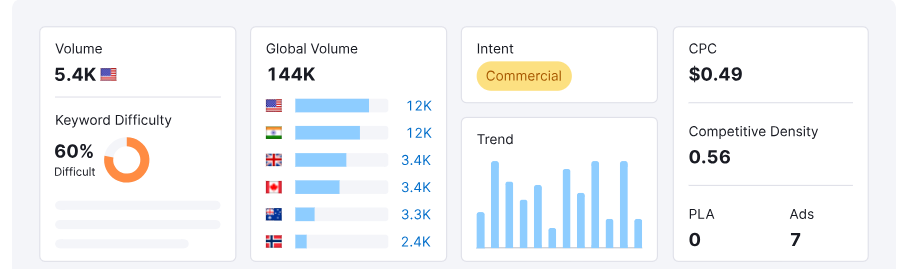
Semrush is a very popular SEO tool used for keyword research, competitor analysis, backlink tracking, domain authority score monitoring, and AI overview/AI mode visibility monitoring.

semrush

ragseoAI Visibility: Recent major changes to the Google search box clearly demonstrate that tracking a brand's visibility in Google and AI searches is becoming increasingly important. Therefore, we should continuously adapt to the new era of search, discover new growth data opportunities, and improve brand visibility everywhere users can search! Semrush allows you to see specific instances of your brand being mentioned by AI, such as customer inquiries GEO (Generative engine optimization) terms, cited pages, and cited brand names.
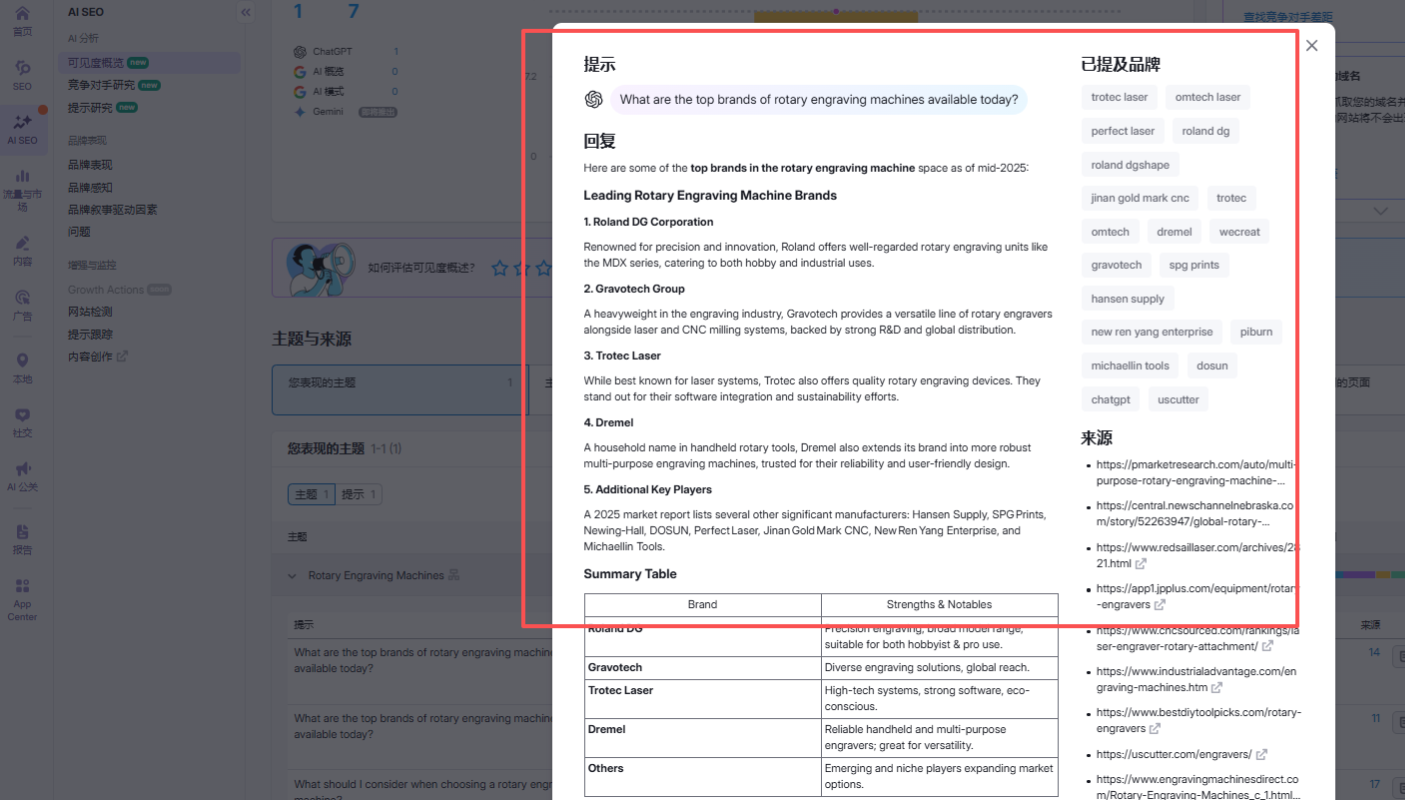
AI Visibility
By using Semrush's Keyword Overview, Keyword Magic Tool, Keyword Strategy Builder, and other modules, we can compile information such as keyword search volume, keyword competitiveness, search intention, and competition level. Based on this data, we can quickly determine which types of keywords should be placed on which pages, and what long-tail keywords we should embed at each stage of website operation. By achieving the phased goals of keyword ranking, we can continuously improve the overall website authority.

Semrush's Keyword Overview

2. Screaming Frog SEO Spider - Real-time monitoring of website links, enabling effective SEO auditing.

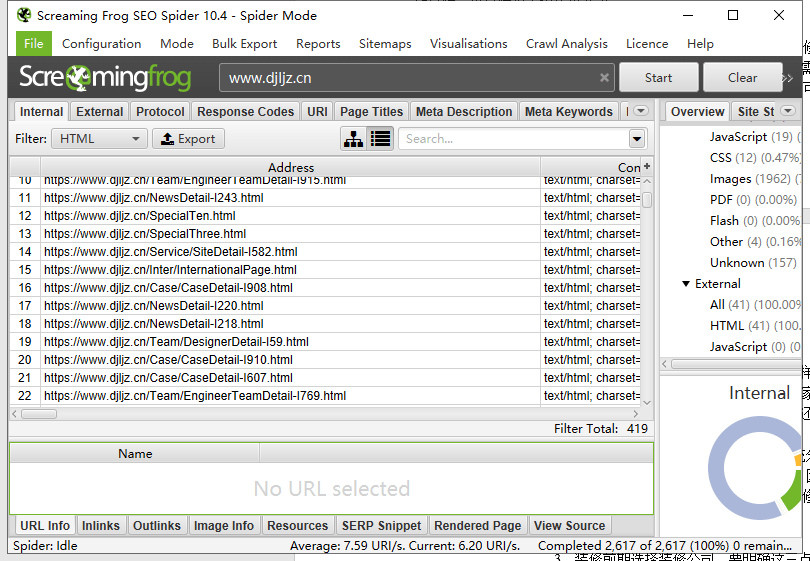
Website pages can only be clicked, ranked, and exposed after they are indexed. Therefore, crawling the entire site's links is one of the more important tasks. Monitoring the entire site's web links and pages that return status codes such as 200, 404, and 301 requires specific analysis. Pages that need to be addressed should be optimized until they are indexed by Google.

To crawl the links of an entire website, you'll need tools to do it, such as Screaming Frog SEO Spider. This tool can run on Windows, Linux and enables performing SEO audits, crawling dead links, redirect links, duplicate content, page meta tags, and more. You can use this tool to regularly check your website and adjust your optimization direction in a timely manner.

Screaming Frog SEO Spider

3. Google Search Console (GSC) - monitor organic search traffic and adjust search direction in a timely manner based on user queries.

Besides third-party data monitoring tools, Google Search Console, an officially certified tool from Google, is also indispensable. Google Search Console shows users who search for certain keywords and reach your website pages, along with the corresponding keyword rankings, impressions, and click-through rates(CTR). By continuously updating with high-quality content, you’ll gain Google's trust, improve your website's overall authority, and thus boost its ranking. Furthermore, this tool can also monitor page indexing, Google crawl logs, removed links forbidden from the search results page, monitor website performance on PC and mobile devices, and much more. Many functions can be completed, and as an officially certified tool from Google, it is highly reliable!

Google Search Console

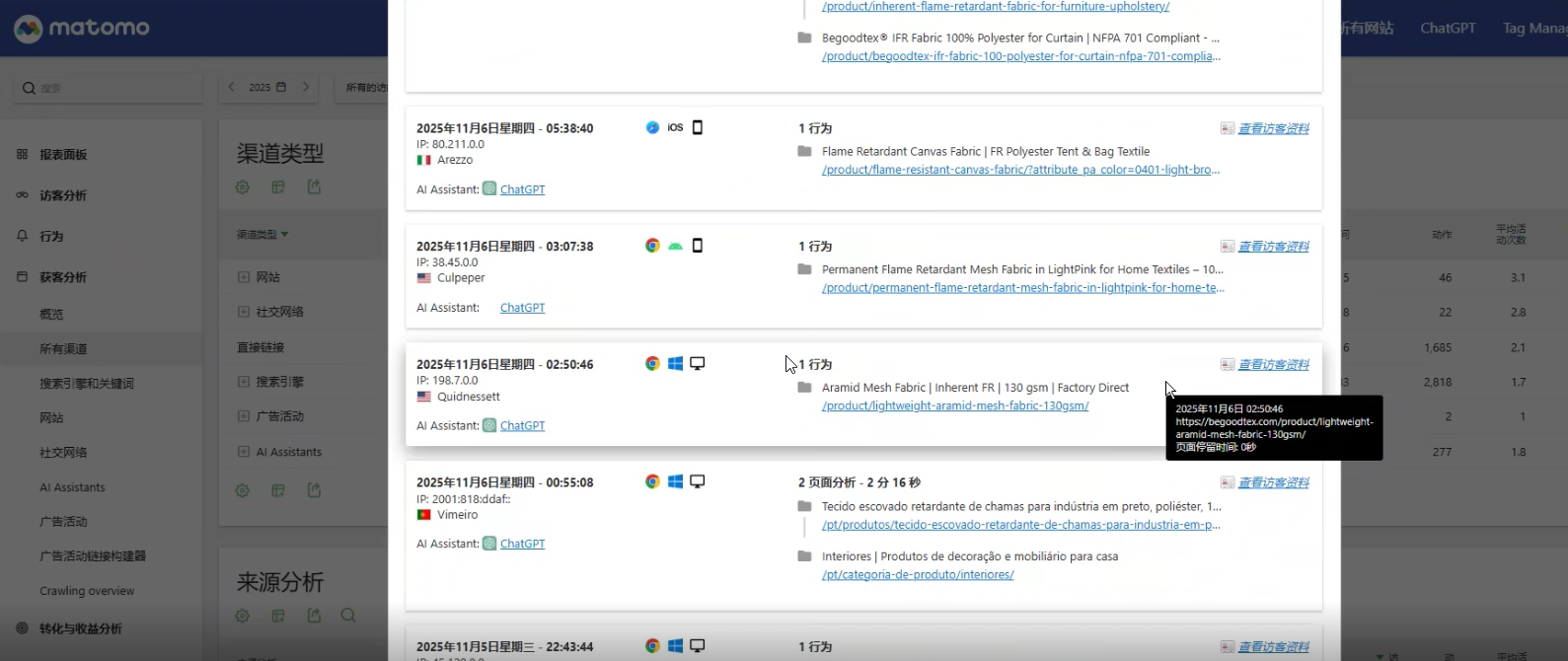
4. matomo - Where do your website visitors come from? Where can I view visitor sources?

Matomo, formerly known as Piwik, is an open-source website analysis and data statistics tool. It provides insights into user traffic sources, final page visits, page dwell time, user behavior analysis, and more. When your website data declines, traffic suddenly surges, or you struggle to analyze your data, this tool can offer solutions. It tracks mouse movements, button clicks, page browsing paths, and provides real-time access to data such as page views (PV) and unique visitors (UV). It can also track keyword rankings and page content quality. Matomo allows you to achieve any desired functionality!

Matomo

5. Answer the public - Create high-quality content and write trending topics that attract user clicks!

Since blog posts and news updates on a website can be updated in real time, what kinds of topics related to your industry are likely to be searched by users and indexed by Google? These are common questions that plague SEO article topics. Answer the public, an SEO content topic trend research tool, can effectively help you find trending topics related to your products, monitor product development trends in real time, overcome writing plateaus, and provide you with the latest content ideas.

Answer the publicFurthermore, based on the glossary information provided by the AI overview, we can also find frequently asked questions in ChatGPT, such as
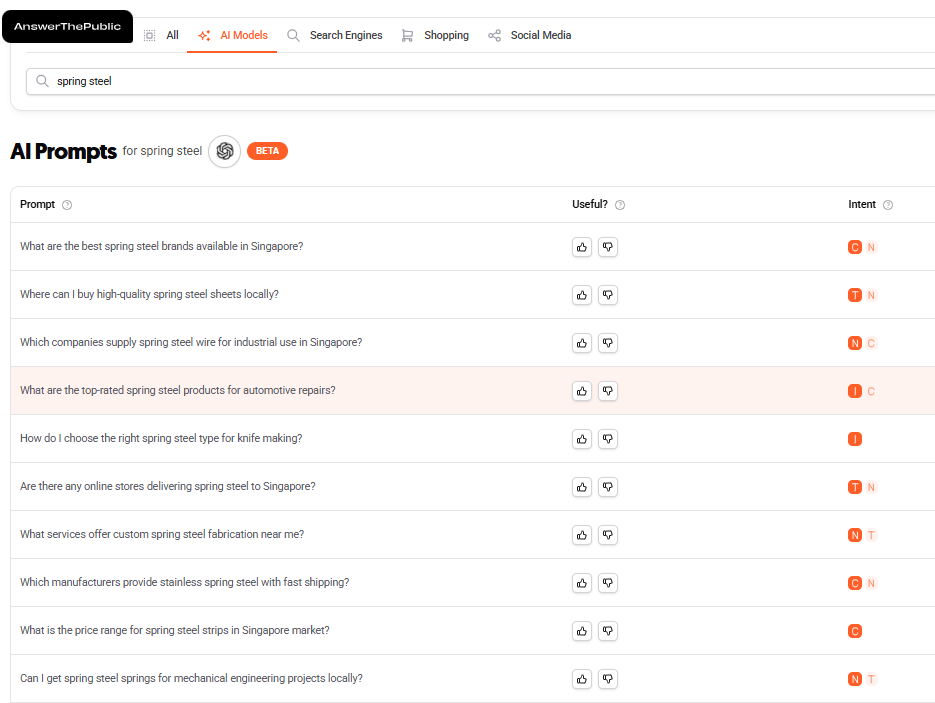
"What are the best spring steel brands available in Singapore?"

Where can l buy high-quality spring steel sheets locally?

Which companies supply spring steel wire for industrial use in Singapore?”

These can help us effectively identify trending topics that users are currently interested in, so we won't have to worry about creating high-quality articles!

AI overviewThese tools include functions such as data monitoring and analysis, website SEO audit, article topic selection, and keyword research. The key is not the quantity of tools, but whether they meet your needs. If you are interested in these above tools, feel free to leave a message and I will provide you with the best solution!

 

Read More
ragseo November 17, 2025 0 Comments

2025 Google SEO Latest Strategies, Super Comprehensive and Super Practical

1.The Evolving Landscape of Google Search Engine Optimization in 2025

In an ever-evolving digital landscape, Google Search Engine Optimization (SEO) remains the cornerstone of online success for businesses. However, Google's search algorithm continues to evolve, necessitating proactive strategies to maintain and enhance their online visibility.

Looking ahead to 2025, the key to Google SEO lies in embracing the rise of artificial intelligence (AI), prioritizing user experience, and consistently delivering high-quality, trustworthy content. Traditional keyword-centric SEO approaches are giving way to more holistic approaches focused on understanding user intent and improving overall user engagement.

This report delves into the key areas of Google SEO in 2025, providing website owners, marketing managers, and SEO professionals with expert guidance on optimizing their website's performance in Google search results in 2025. Like, bookmark, and read on!

2.The Latest Google Search Essentials and Algorithm Updates for 2025

To effectively conduct Google SEO in 2025, it's crucial to understand and adhere to Google's latest guidelines. Google Search Essentials has replaced the previous Webmaster Guidelines as the core reference for all web content creators. These essentials emphasize three core areas: technical requirements, spam policies, and key best practices. One key best practice is creating helpful, reliable, and human-centric content.

In addition to these essentials, continuously monitoring Google's algorithm updates is crucial for your SEO strategy. Google regularly releases core algorithm updates designed to improve how its core ranking system evaluates content, including its relevance, quality, depth, and usefulness to searchers. For example, the March 2025 Core Update emphasizes the importance of using E-E-A-T (Experience, Expertise, Authoritativeness, and Trustworthiness) signals to assess content quality.

3.Google's Search Quality Rater Guidelines

These guidelines provide a framework for evaluating the quality of search results and guide raters in assessing whether content is AI-generated and prioritizing original and useful content. Furthermore, Google is increasingly focusing on combating spam, including new forms of spam such as expired domain name abuse and site reputation abuse. These developments indicate that SEO strategies in 2025 must closely monitor Google's latest guidelines and algorithm updates to ensure compliance with best practices and avoid penalties.

1. Unlocking User Intent: Advanced Keyword Research Strategies for 2025

In 2025, keyword research will be more than just finding high-volume search terms; it's more about understanding the user intent behind those searches. With the rise of voice search and AI assistants, long-tail and conversational keywords are becoming increasingly important.

AI-powered tools are revolutionizing keyword research, helping marketers conduct intent mapping and gain a deeper understanding of their audience. Keyword research in 2025 is shifting from a volume-centric approach to one centered on intent, requiring a deeper understanding of user needs at different stages of the buying process. In addition to traditional keywords, consider incorporating conversational and visual keywords to adapt to the usage habits of users across multiple devices.

Analyzing competitor keyword strategies remains key to identifying keyword gaps within your own website. Effectively utilizing various keyword research tools is crucial for discovering valuable keywords. AI is transforming keyword research by automating tasks like brainstorming and topic clustering, freeing SEO professionals to focus on strategic content creation.

2025-Google-SEO-Latest-Strategies,-Super-Comprehensive-and-Super-Practical

2. Content is King: Optimize Website Content to Increase Relevance and Engagement in 2025

In 2025, high-quality, original, and useful content will remain the cornerstone of Google SEO. When creating content, emphasizing E-E-A-T (Experience, Expertise, Authoritativeness, and Trustworthiness) is crucial. Optimizing content structure to enhance readability and engagement, including the use of headings, subheadings, bullet points, and multimedia elements, will also improve readability and engagement.

Strategically incorporating keywords into content, titles, meta descriptions, and headers remains crucial. As AI expands in search results, optimizing for featured snippets and AI overviews, providing concise, direct answers, and structured formats will become increasingly important. Multimedia (images, videos, infographics) plays a key role in enhancing user engagement and SEO. Maintaining content freshness and relevance is essential to maintaining rankings in the ever-changing search landscape.

In 2025, content will need to go beyond simply answering questions and provide original insights, research, and analysis to stand out from the crowd of AI-generated content. With the rise of AI overview and answer engines, optimizing for “zero-click” searches has become increasingly important because AI provides more direct answers on the search results page.

3. Build a Solid Foundation: Technical SEO Best Practices for 2025

A strong technical SEO foundation is crucial to ensuring search engines can effectively crawl and index your website content. Site speed optimization and Core Web Metrics (LCP, FID/INP, CLS) remain key ranking factors. With the ongoing mobile-first indexing movement, ensuring mobile-friendliness and responsive design are crucial.

Optimizing your website architecture, including the site hierarchy, URL structure, and internal linking, is crucial for improved crawling, indexing, and user navigation. Implementing schema markup (structured data) helps search engines understand your content, potentially resulting in richer search results. Ensuring your website is secure and using HTTPS is crucial. Using robots.txt and sitemaps facilitates efficient crawling and indexing.

4. The Power of Links: Effective Link Building Strategies for 2025

While high-quality content is the foundation of SEO, building high-quality external links remains crucial. The focus of link building has shifted from quantity to quality, emphasizing backlinks from authoritative and relevant domains. Content marketing remains the primary strategy for earning backlinks. Digital public relations (PR) is becoming increasingly important in acquiring high-authority backlinks and brand mentions.

Guest blogging on relevant and authoritative websites remains an effective way to build backlinks and expand your reach. Identifying competitors' backlink strategies can uncover new opportunities. Repairing broken links and reclaiming lost links remain valuable strategies. Avoiding black hat SEO link building techniques (such as private networks, link farms, and un-nofollowed paid links) is crucial to maintaining your website's credibility.

5. User First: Prioritize User Experience and Accessibility for SEO Success in 2025

User experience (UX) will continue to play a key role as a direct and indirect Google ranking factor in 2025. Optimizing usability and responsiveness for mobile devices is crucial. Improving website navigation and site architecture for a better user experience is crucial. Ensuring content readability and accessibility for all users, including those with disabilities, is increasingly important. Minimizing intrusive ads and pop-ups for a better user experience. UX metrics such as bounce rate, dwell time, and click-through rate are becoming increasingly important as search engine algorithms assess content quality and relevance.

6. Navigating the AI ​​Era: Optimizing AI Overviews and Answer Engines

With AI taking an increasingly prominent role in search results, optimizing AI overviews and answer engines has become a key SEO strategy for 2025. Creating content in a question-and-answer format is crucial for AI to easily understand and summarize. Provide concise and clear answers (40-60 words) and use clear headings (H1-H3) and schema markup to structure your content. Using bullet points, lists, and tables can improve readability for AI.

To rank higher in AI overviews, it's crucial to provide comprehensive and well-structured content that directly answers user questions and ensures that the content is authoritative, relevant, and easily digestible and summarized by AI. Optimizing for long-tail keywords and question-based queries is becoming increasingly important. Beyond Google, consider optimizing for emerging answer engines like Perplexity and ChatGPT Search, which are becoming increasingly important sources of information. This requires adjusting traditional SEO strategies to ensure that content can be easily referenced and summarized by these AI-driven platforms.

2025-Google-SEO-Latest-Strategies,-Super-Comprehensive-and-Super-Practical

7. Stay Compliant: Follow Google Guidelines and Avoid Black Hat SEO

Adhering to Google's guidelines is crucial for maintaining website visibility and avoiding penalties. Familiarity with and adherence to Google Search Essentials, including its technical requirements, spam policies, and key best practices, is the foundation of any SEO strategy. Avoiding black hat SEO techniques such as keyword stuffing, hidden text and links, link farms, and paid links without nofollows is crucial.

SEO strategies in 2025 must be user-centric, not simply optimizing content for search engines. Google's guidelines clearly emphasize creating helpful, reliable content, which should always take precedence over attempting to gain rankings by manipulating the algorithm. Staying up-to-date on Google's algorithm updates and guidelines and ensuring all SEO activities are ethical are crucial for maintaining long-term success in 2025 and beyond.

8. Measuring Success: Monitoring and Analyzing SEO Performance in 2025

Continuously monitoring your website's SEO performance is crucial to understanding the effectiveness of your strategy and making data-driven adjustments. Leverage Google Search Console to track keyword rankings, organic traffic, index coverage, and technical SEO health. Use Google Analytics 4 to analyze user behavior data, including bounce rate, session duration, and conversion rate.

Utilize various SEO tools to track keyword rankings and identify opportunities. Analyze backlink profiles to identify opportunities and potential problems. Set up custom dashboards and automated reports for efficient monitoring.

SEO reports should focus on key performance indicators (KPIs) related to business goals, including conversion rates, organic traffic, keyword rankings, and user engagement metrics. Continuously analyzing and adjusting SEO strategies based on these data analysis results is crucial.

4.Conclusion: Future-Proofing Your Google SEO Strategy for Long-Term Success

In 2025 and beyond, Google SEO success will depend on employing a comprehensive and adaptable strategy. Prioritizing the creation of high-quality, user-centric content, optimizing your website's technical foundation, and building a strong backlink profile will remain crucial. However, with the rise of artificial intelligence, optimizing your AI overview and answer engines, as well as prioritizing user experience and accessibility, will become increasingly important. By continuously learning and adapting to Google's evolving algorithms and guidelines, businesses can future-proof their SEO strategies and position themselves for long-term success.

ewm

Read More
ragseo September 26, 2025 0 Comments

When doing Google SEO, is there a way to estimate how many customers I can bring in?

This is the most pressing question for every business owner considering SEO.

The answer is: there are ways, but they're not 100% accurate.

We can roughly estimate the number of customers we'll bring in through SEO by following these steps:

1. Look at keyword search volume

The first step is to see how many people search for keywords in your industry on Google each month.

For example, if you sell outdoor lighting, terms like "outdoor wall lights" and "solar garden light" might have thousands or even tens of thousands of searches each month. This indicates customer demand.

Google Keyword Planner is a specialized search tool provided by Google. If you're unsure how to use it, please contact me on WeChat.

2. Estimate Your Traffic Amount

Suppose you rank first on the homepage for a keyword, you can expect an average click-through rate of 30%; third on the homepage, about 15%; and at the bottom of the homepage, about 5%.

For example, if a keyword has 5,000 searches per month, if you rank in the top three, you can theoretically expect 750-1,500 clicks per month.

Adding multiple keywords together gives you an overall expected traffic volume.

3. Consider your website's conversion rate

Not every visitor to your website will place an order, but some will always send inquiries.

The average inquiry conversion rate for an international trade website is approximately 1%-3%. This means:

For every 100 visitors, you might receive 1-3 inquiries;

For every 1,000 visitors, you might receive 10-30 inquiries.

If your products fall into the high-value-added, high-trust B2B market, such as machinery or medical devices, your conversion rate may be lower, but your average order value may be higher.

4. Final number of orders = number of inquiries × closing rate

Even with inquiries, it also depends on your team's follow-up capabilities, the quality of your clients, and price matching.

Assuming you receive 50 inquiries per month through SEO and have a closing rate of 10%, you can expect to close approximately 5 orders per month.

In short:

SEO isn't a spur-of-the-moment investment; it's a project with measurable expected returns.

The key factors that can truly help you make a decision are keyword search volume, website conversion rate, and the quality of your customer follow-up.

If you need it, we can help you measure the Google search popularity of your industry for free to determine its potential and potential before deciding whether to invest.

Want to see a keyword analysis report for your industry? Add me on WeChat and leave a message with "industry name + SEO."

Read More
ragseo September 26, 2025 0 Comments
Home
Tel
Email
WhatsApp