Google Analytics vs Search Console: Which Is Better for SEO?

Introduction
In the great debate between Google Analytics and Google Search Console for SEO, the very brief and concise answer is that: both are indispensablyimportant, yet they have different functionalities. Google Analytics displays the behavior of the users who have already visited your site, while the other one, Google Search Console, shows the position of your site in Google searches, and how well it performs there.
What Google Analytics Does for SEO
 Google Analytics (GA) is a tool that measures visitor behavior at your site. It is all about the journey after the click.
Core Capabilities
- Visibility of the origin of website visitors. (organic, paid, social, direct, or referral)
- Indication of users’ actions on the site along with their duration.
- Engagement metrics such as bounce rate, session duration, and interactions are provided.
- Conversion data including actions like sign-ups, purchases, and form submissions is also provided.
Where GA Helps with SEO
Though GA is not directly a search tool, it still provides great insight into:
- The most engaging pages for users.
- The areas where there is low traffic, which can indicate problems with the content or user experience.
- The participation of the various channels in your audience.
Limitations to Keep in Mind
- Does not provide information about search impressions or the position of your site in Google’s result pages.
- Depends on a tracking code, which means that if there is a problem with it, or if the user blocks JavaScript, the data could be incomplete.
- Concentrate on the user activity after the visit to the site, not the one before.
In the event that the figures from GA do not exactly correspond to those in Search Console, just remember that this is something that usually happens. GA and GSC frequently report different numbers because they are looking at different moments (sessions vs clicks).
What Google Search Console Offers SEO
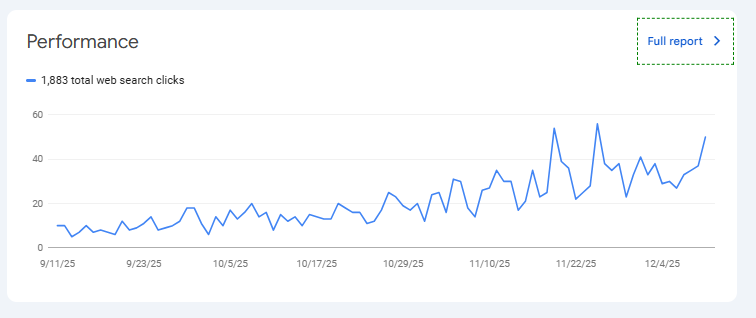 The Google Search Console (GSC) is the source that provides the measurements of your website from the standpoint of Google itself. It talks about search visibility, crawlability, and indexing — the pre-click world that GA cannot measure.
Key Reports in Search Console
- Search performance: for search queries the displayed data includes impressions, clicks, the click-through rate (CTR), and the average position.
- Index coverage: it provides information about the indexed pages and those with issues.
- The tools for URL inspection and submission of the sitemap.
- Mobile usability, Core Web Vitals, notifications about security issues.
- The status of backlinks and the scheme of the internal links.
Why It Matters for SEO
The Search Console mainly presents inquires like these:
- Which queries from the search engine bring users to my website?
- Are the search engine bots able to crawl and index my pages appropriately?
- Is there a problem of technical nature such as mobile friendliness that is causing my pages to lose their ranking?
Things It Doesn’t Do
- Only Google Search is included in the list of traffic sources (all other traffic sources are excluded).
- The data presented for obviously search is not real-time and has a slight delay (typically a two-day delay).
- The amount of historical data is restricted (usually it is about 16 months).
A minor complexity, which is worth mentioning, is that Search Console keeps track of the number of clicks coming from Google Search, while Analytics counts the number of sessions coming from all sources. Consequently, similar metrics in both tools might display different figures because of this reason.
Side-by-Side Comparison
Before Click vs After Click
- GSC provides data about your site’s visibility in Google Search (including queries, impressions, clicks, and ranking).
- GA clarifies user actions on your site after they land there (including behavior, conversions, and engagement).
Traffic Scope
- GSC monitors just the organic Google search traffic.
- GA accounts for all traffic channels: social, email, referral, paid, organic, and direct.
Reports and Analytics
- GSC is less reliant on graphs but still provides a lot of insights that are centered around search.
- GA is still the one that provides extensive segmentations and detailed reports on user behavior.
- Technical SEO
- GSC discloses issues with crawling, indexing, and it also flags the health of the site.
- GA is not in the business of diagnosing technical search problems.
Best SEO Practices Using Both Tools
Rather than choosing “the best SEO tool,” most SEO teams rely on both because each answers a different part of the SEO puzzle.
How They Work Together
- Link Search Console to Google Analytics so search performance data appears inside GA reports.
- Use GSC to identify rising or falling queries or detect indexing issues.
- Use GA to analyze how visitors arriving via those queries behave and whether they convert.
Practical Workflow Example
- Notice a drop in impressions for a keyword in Search Console.
- Check the landing page’s engagement and bounce rate in GA.
- If engagement is low, update the content or adjust UX.
Cross-tool analysis like this leads to practical SEO improvements rather than guessing from a single dashboard.
Final Thoughts: Which Is Better?
There’s no single “better” tool — it depends on your goal.
- If the focus is fixing search visibility, monitoring indexing, or understanding how your site appears in Google, Search Console is the answer.
- If the priority is tracking user journeys, engagement trends, or conversion paths after visitors arrive, Google Analytics is the stronger choice.
Used together, they provide the full picture of organic performance. That combined view is what most SEO professionals rely on to make confident decisions — not guesswork.